For guitalele players
The guitalele tuner that starts on A D G C E A.
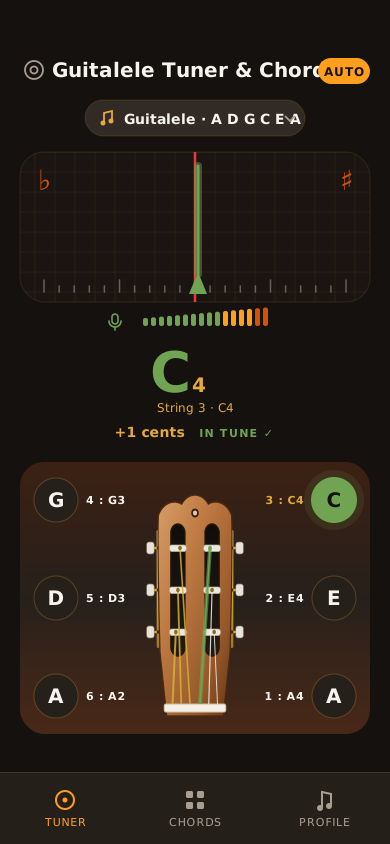
Most tuners assume a guitar and make you hunt for the right setting. Guitalele Tuner & Chords opens on guitalele tuning, listens through your phone’s microphone, and shows how far each string is from where it should be.
Android and iOS. Audio is analysed on your device and never recorded or uploaded.
The instrument
A guitar, a fourth higher.
A guitalele has six strings like a guitar but is tuned five semitones up, so the same finger shapes sound as different chords. The app is built on that fact: the tuning, the headstock drawing and the chord names all follow it.
- Guitar
- E A D G B E
- Guitalele
- A D G C E A
What it does
Five things, done properly.
Everything listed here is in the app today.
- 01
Tune by ear and by eye
Pluck a string and the meter shows how many cents you are off, Auto mode works out which string you played; or tap a string button to lock onto it.
Microphone · live meter - 02
Built around A D G C E A
The default tuning is the guitalele’s. The headstock, string buttons and target pitches all follow it. Standard guitar tuning (E A D G B E) is one tap away.
A2 D3 G3 C4 E4 A4 - 03
Hear the target first
Tap any string button to hear its reference tone, with the waveform drawn across the meter, then bring your string up to meet it.
Reference tones - 04
47 chords, named for the guitalele
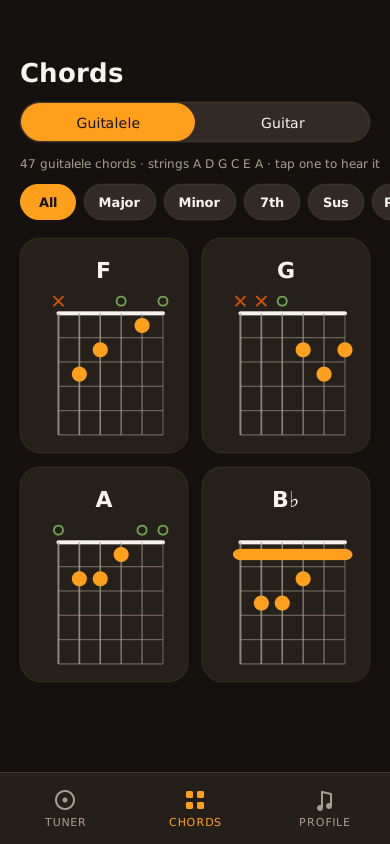
Every guitar shape is renamed to the chord a guitalele actually sounds. Guitar C becomes F. Filter by Major, Minor, 7th, Sus, Power or Other, then tap a chord to hear it.
Chord library - 05
A short guide, no account
The Profile tab holds a plain-language tuning guide. There is no sign-up and no login. The app has no advertising or analytics code.
App guide
How it works
Open, allow, pluck, tune.
Open the tuner
The Tuner tab is the first screen, set to guitalele (A D G C E A).
Allow the microphone
Say yes when asked, so the app can hear the string. You can change this in system settings any time.
Pluck, then turn the peg
One open string, let it ring. Needle left is flat, right is sharp. Stop when it shows in tune.
Try some chords
The Chords tab shows fingering diagrams and plays each chord so you can check your sound.
Chords
Chord names that match your instrument.
Chord charts for a guitalele are usually copied from guitar ones, which leaves you translating in your head. Here a guitar C shape is labelled F, because that is what your guitalele plays.
- Guitalele or guitar. One switch at the top of the screen.
- Filter by type. All, Major, Minor, 7th, Sus, Power, Other.
- Tap to hear. Each chord opens large and plays, with the pitch of each string.
No extra gear
Your phone’s microphone is enough. Nothing to clip on, nothing to charge.
Tuning and chords together
Tune up, then flip to the Chords tab without leaving the app.
Listen first
Reference tones let you hear the target before you touch the peg.
Your playing stays on your phone.
Microphone audio is analysed on your device and is not recorded, stored or uploaded. No accounts, ads or analytics. The full Privacy Policy covers the details, including the one thing to know about fonts.
FAQ
Questions players ask.
Which tuning does the app support?
The default is standard guitalele tuning, A D G C E A (a fourth above standard guitar tuning). The tuner can also be switched to standard guitar tuning, E A D G B E.
Why does the app need microphone access?
The tuner listens to the string you pluck so it can work out its pitch. Without microphone access the tuner cannot hear your instrument. The Chords tab and the guide don’t need the microphone.
Does the app record or upload my audio?
No. Audio from the microphone is analysed on your device in real time and is not saved to storage or sent to us. See the full Privacy Policy for details.
Does it work offline?
Tuning, reference tones, chords and the guide don’t require an internet connection. The app doesn’t include any sign-in or cloud features. One caveat: the current version may download its interface typefaces from Google Fonts the first time it runs online; offline, it falls back to a system font. This is explained in the Privacy Policy.
Which devices are supported?
The app is built for Android and iOS phones. It is designed for portrait use.
The tuner doesn’t react when I play. What should I do?
Make sure microphone permission is allowed, play a single open string and let it ring, and hold the phone close to the sound hole in a quiet room. The tuner is designed to ignore voices and general noise, so strumming several strings at once won’t register. More help is on the Support page.
Can I tune a regular guitar with it?
Yes. Switch to the Guitar tuning (E A D G B E) from the tuner screen.
Is the app free?
Yes. The app is free, with no advertising and no in-app purchases.
Download
Not in the stores yet.
Guitalele Tuner & Chords hasn’t been published. The store links will go here when the listings are live.
Need help in the meantime? Support.